StoriiCare is constantly working towards powerful new features and product improvements. Here’s a brief overview of our latest updates:
Quick-Look Highlights
- CRM v2 - Manage your enrollment pipeline directly from your StoriiCare dashboard and enroll leads as participants; no separate login required
- eMAR Overview Dashboard - A business-level view of daily medication activity across your center
- Bulk Actions for the Schedule - Cancel or delete multiple schedule entries at once
- Customize Schedule Colors - Schedule bars now inherit tag colors for quick visual organization
- Driver Manifest Export - Generate a printable manifest for transportation routes
- Meal Tracking Updates - Record consumption percentages and see them summarized on the dashboard
- Compliance: Care Plans & Participant Selection - Run Care Plan compliance checks for specific participants or groups
- Interactive Analytics - Click into any chart segment to see exactly which participants make it up
Smaller Updates
- AI Voice Agent Improvements - Faster syncing, smoother turn-taking, and chat alongside voice calls
- "Services" is Now "Rates" - Renamed across the platform to match standard billing terminology
- Automatic Invoice Receipts for Private Payers - Stripe now emails a receipt automatically after payment
- Staff Birthdays on the Dashboard - Now displayed alongside participant birthdays
- Preview PDF Attachments - View PDFs on Notes and Documents without downloading them
- Hours of Operation & Capacity Fields - New fields in Center Settings to store key center details
- Side Panel Redesign - No more hidden menu; every feature is now in plain view
Significant Improvements
CRM v2
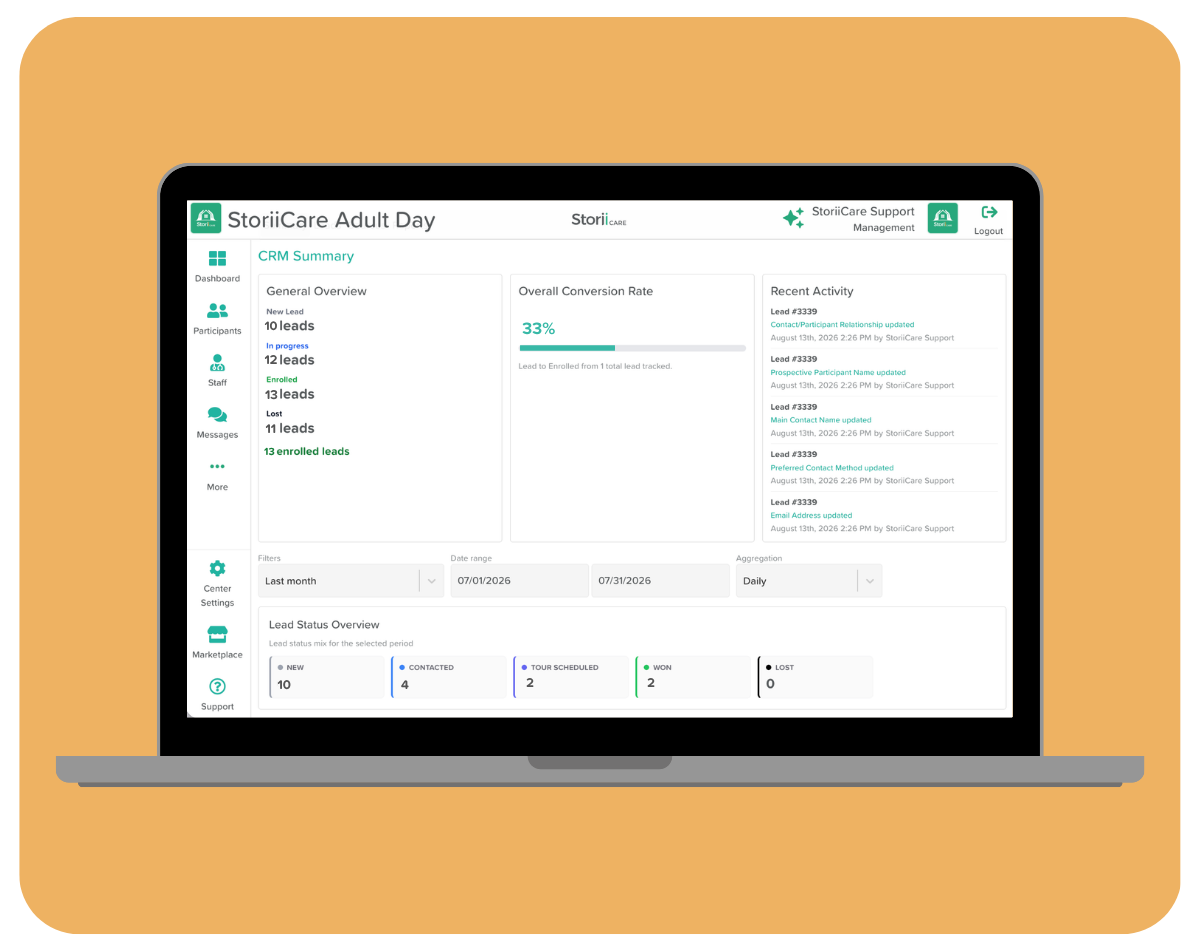
We're excited to launch V2 of our CRM feature! StoriiCare clients can now access the CRM directly from their StoriiCare dashboard, without needing to sign in to a separate dedicated CRM account. The CRM feature helps you track leads, manage your enrollment pipeline, and monitor conversion performance from first contact through to enrollment.
With CRM v2, you can:
- Customize the templates for data stored on Leads and referral Sources - exactly like the Face Sheet and Staff Records features.
- Customize Stages and Statuses for Leads as they move through your pipeline.
- Enroll new leads with a click. Their StoriiCare profile is automatically created, and sales notes can be carried over to their Progress Notes if desired.
- View real-time Summary Metrics such as Conversion Rate, Lead Status, and Most Successful Sources
- Generate a variety of reports, from Lost Leads Analysis and Conversion Rates to Source and Staff Performance reviews.
eMAR Overview Dashboard
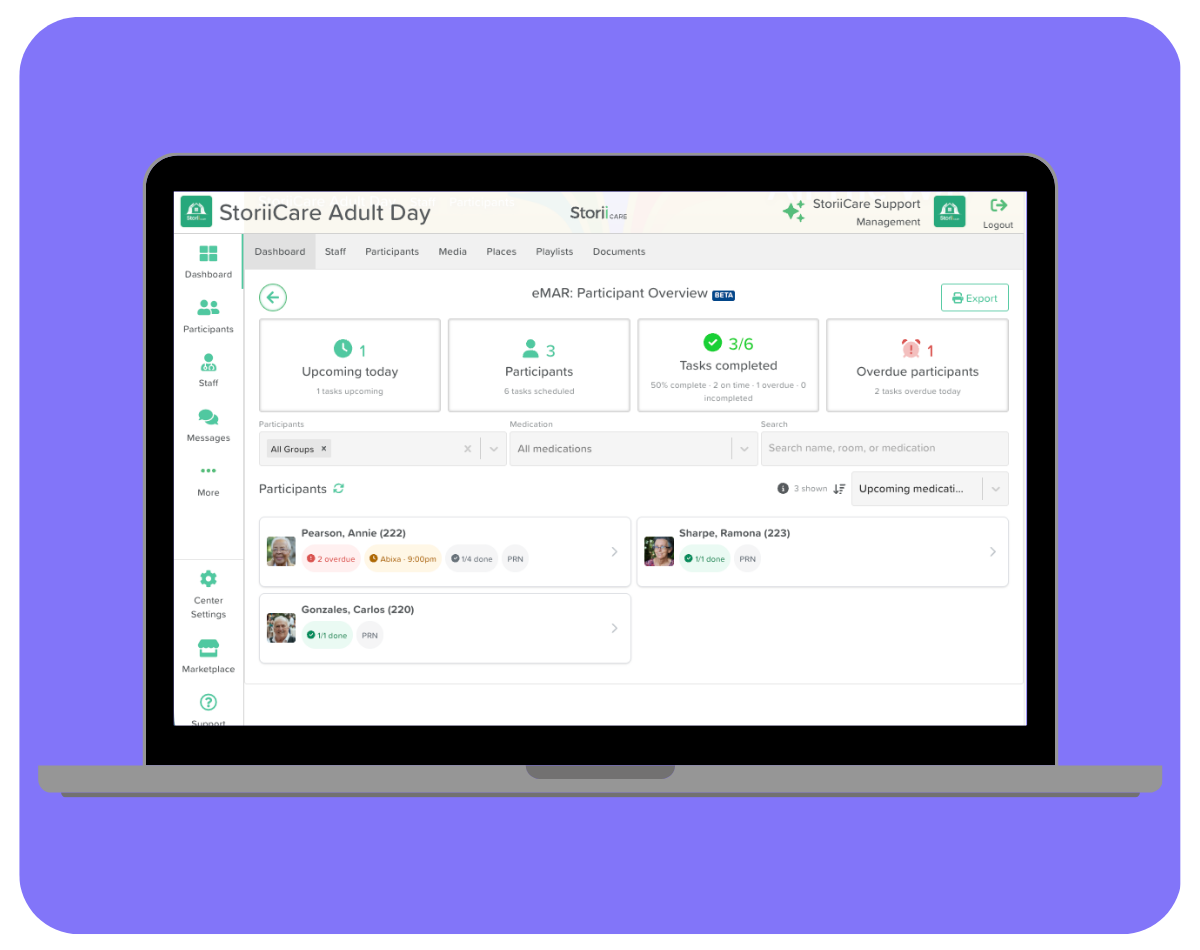
Since introducing eMAR in beta, we've heard from care teams that they want a faster way to see medication administration status across their whole center - not just one participant at a time. The new eMAR Dashboard provides staff with a business-level view of daily medication activity, right from the main StoriiCare Dashboard.
Four summary cards show Upcoming Today, Medications Due Today, Tasks Completed, and Overdue Participants - select any card to filter the participant list to match. Below the summary cards, each participant's card shows their next scheduled medication, an overdue badge if applicable, a completed/total task count, and a PRN badge when relevant, so you can see who needs attention at a glance. Filter by participant, group, or medication, or search by name, room, or medication to narrow things down further.
Need a printable record? Selecting Export from the Dashboard header generates a Daily Medication Administration Record PDF for a chosen date and participant group, separate from the existing MAR Bulk Export.
How to Use the eMAR Dashboard →
Bulk Actions for the Schedule
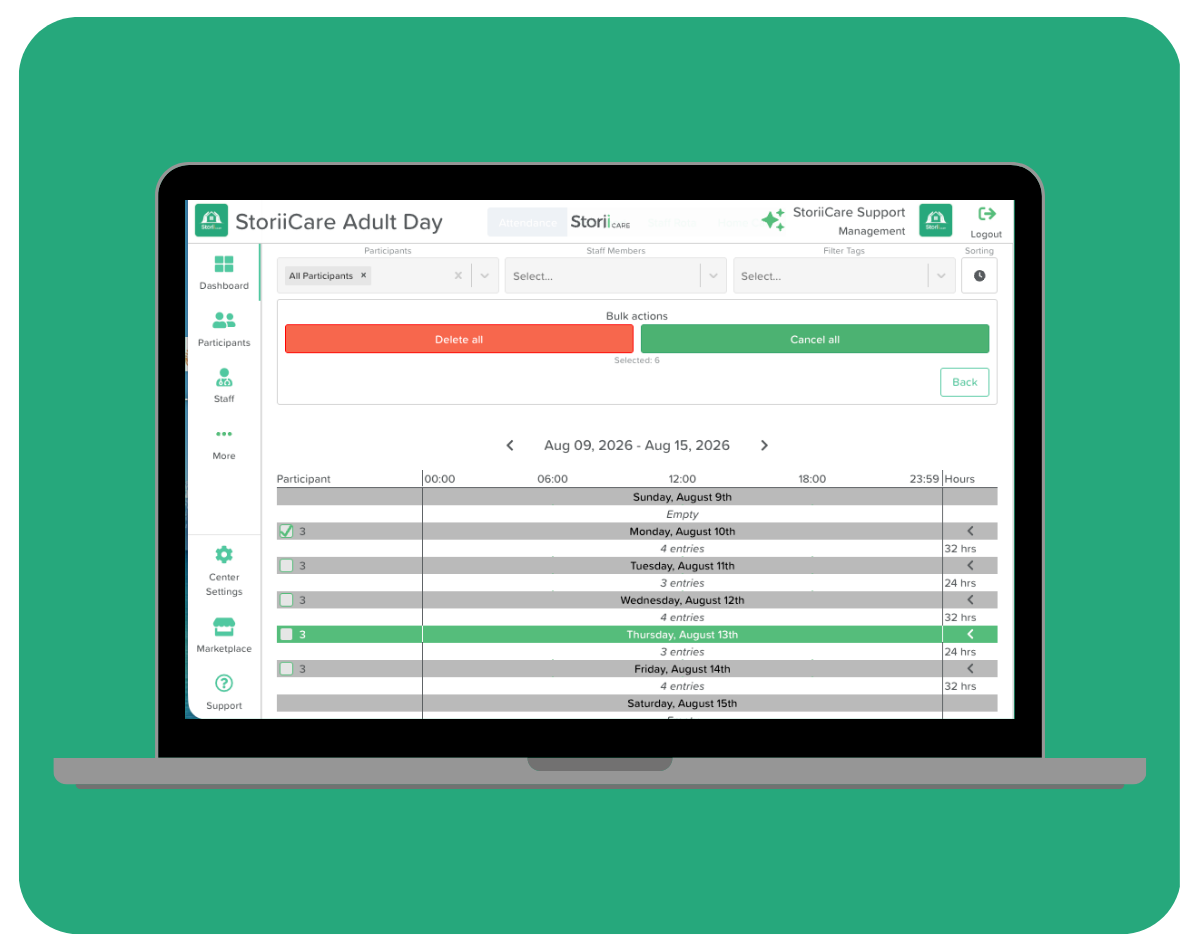
Based on your feedback, care providers can now cancel or delete multiple Schedule entries at once, rather than updating them individually. This is especially useful when a public holiday or center closure affects an entire day, or when a group of participants won't be attending on a specific date.
Available on the Attendance, Staff Rota, Transportation, and Home Care Schedule tabs, the new Multi Select button lets you check off a full day or expand it to select individual entries, then choose Cancel All (entries stay visible with a dashed line and red text) or Delete All (entries are removed entirely). If any selected entries are part of a recurring schedule, you'll be asked whether to cancel just that day or all future recurrences too.
How to Make Bulk Edits to the Schedule →
Customize Schedule Colors
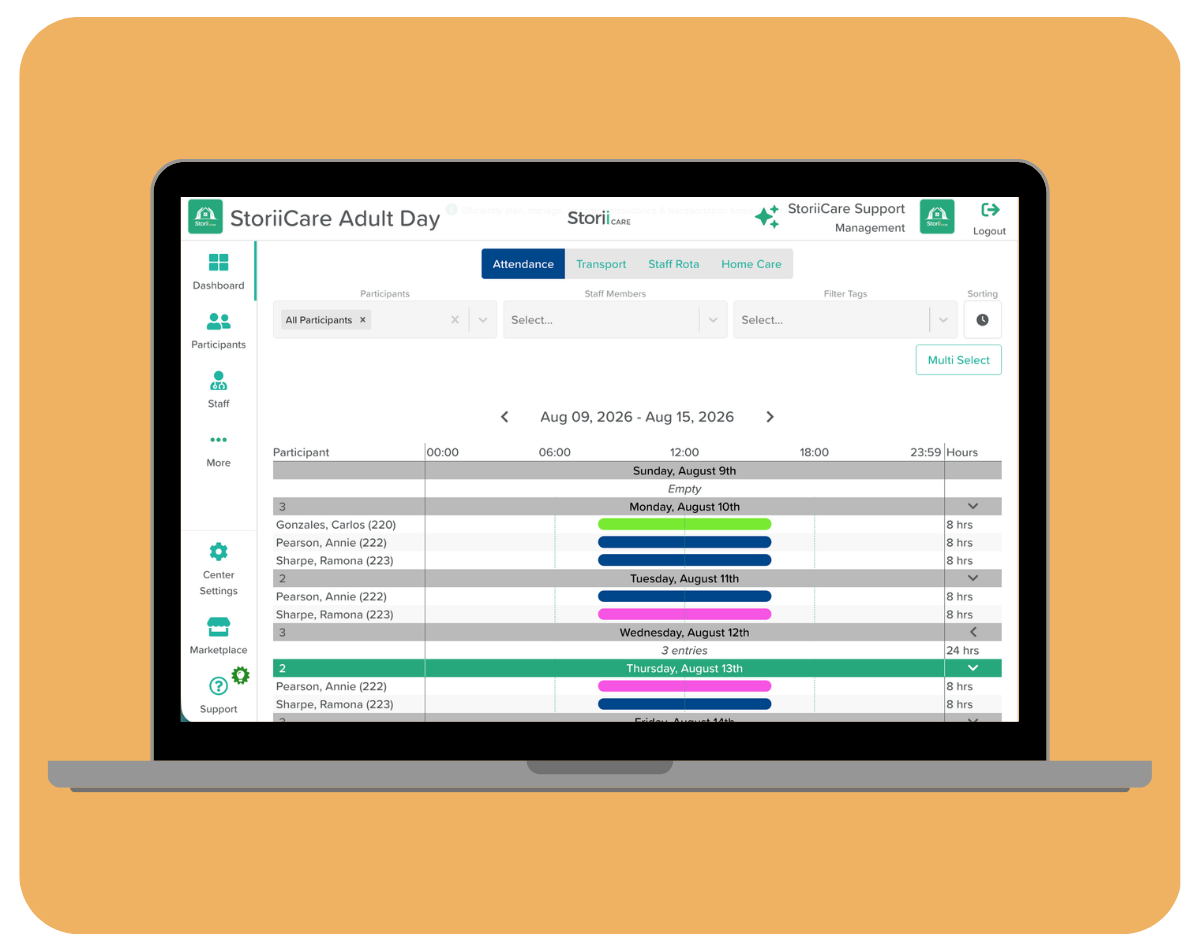
Schedule entry bars have always appeared in navy blue by default. Now, entries will inherit the color of the tag added to them, giving care providers a quick, color-coded way to organize and scan the Schedule at a glance.
How to Change the Color on the Schedule →
Driver Manifest Export
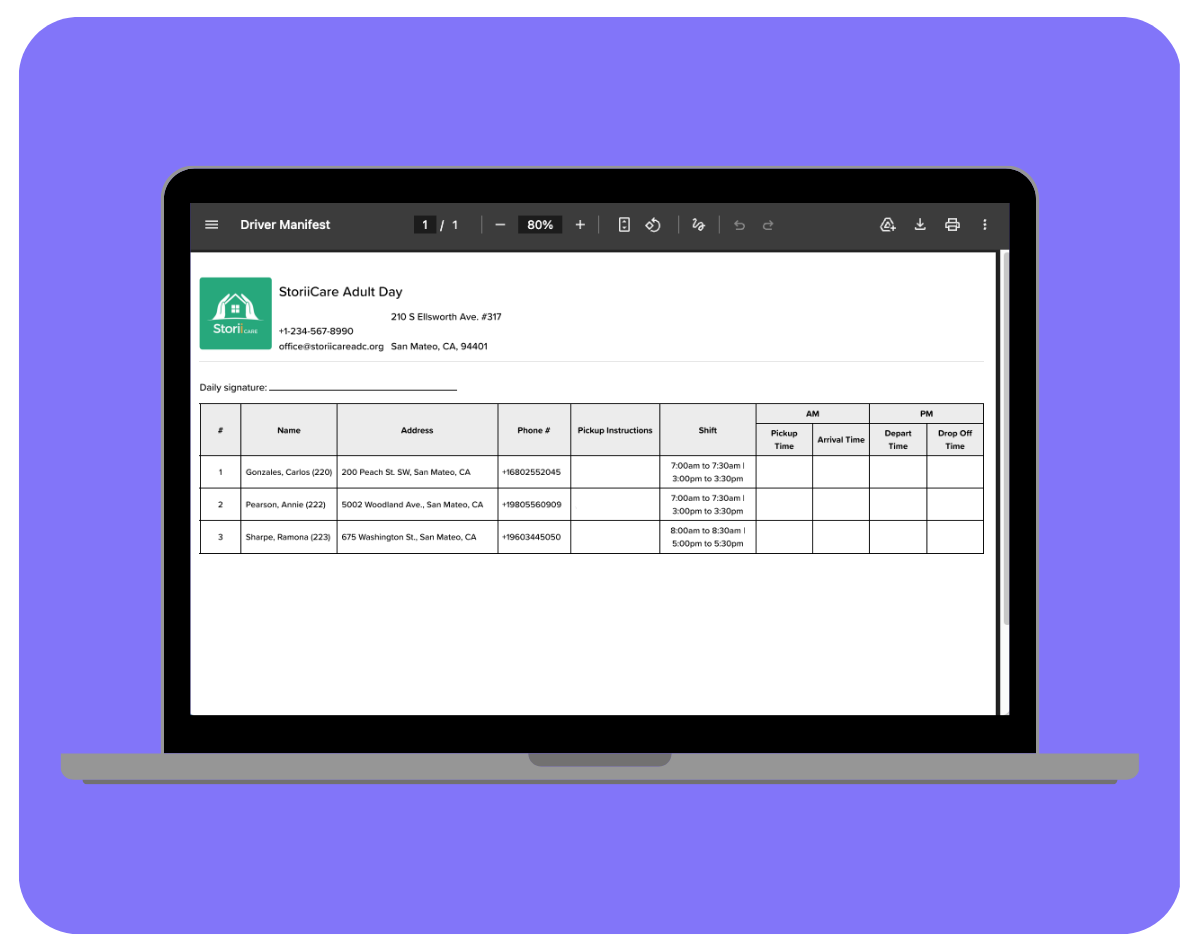
Transportation providers can now export a Driver Manifest - a printable PDF drivers can use to track pickups and drop-offs for scheduled transportation. Access it from the Schedule feature's Export button or from Exports on the Dashboard, then select the Transport tab and choose Driver Manifest PDF as the file type.
You can choose which participants to include, filter by schedule tag, select a date, and configure which Face Sheet fields pull through: Address, Phone #, Pickup Instructions, Accessibility, and Shift (scheduled pickup/drop-off windows). The final PDF leaves the AM/PM time columns blank so drivers can record actual pickup and drop-off times by hand alongside the scheduled windows.
How to Export a Driver's Manifest →
Meal Tracking Updates
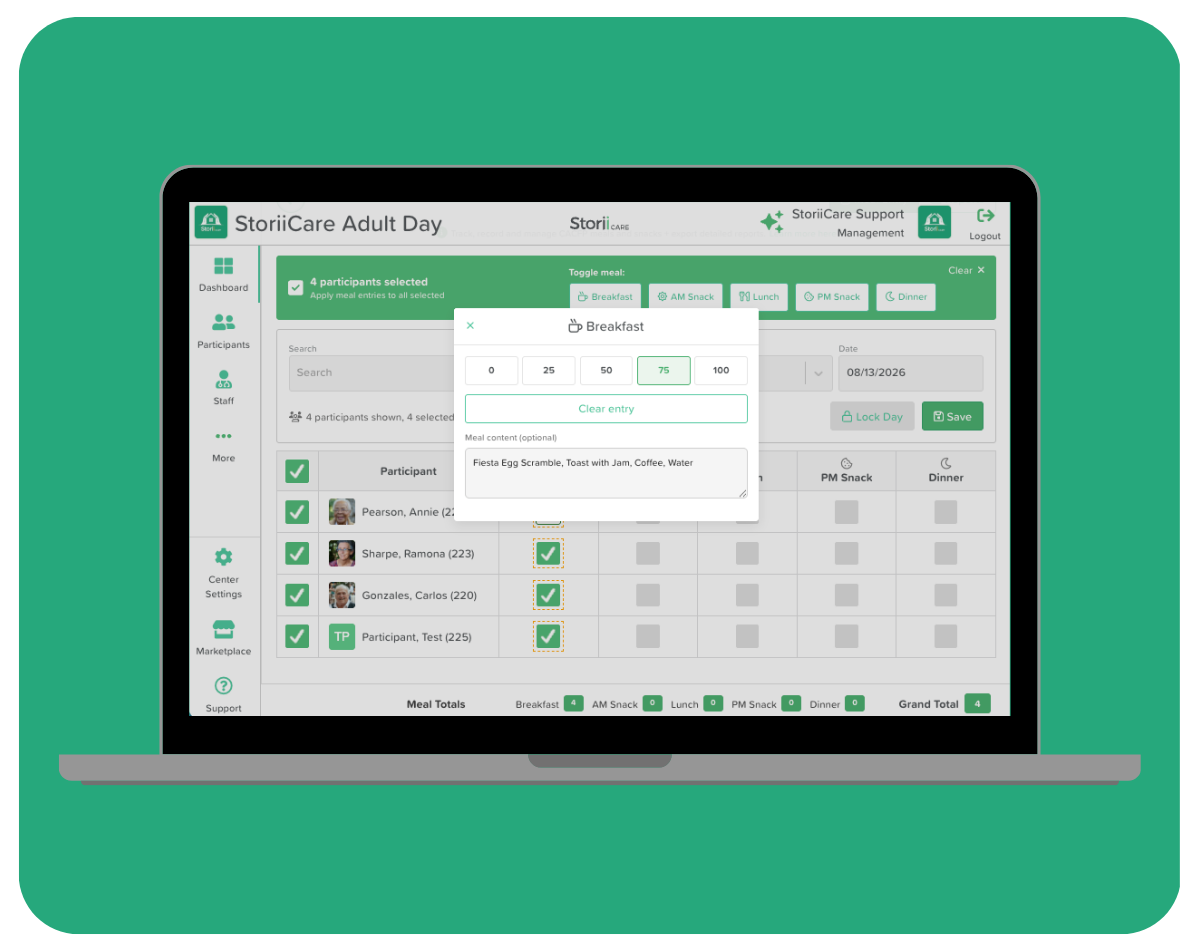
We released a CACFP-compliant Meal Tracking feature in June, and based on your feedback, we've added several enhancements to make sure it fits into your daily workflow. You can now record a meal consumption percentage and note what was eaten for each participant, right alongside the existing meal count. The Meal Tracker dashboard now displays consumption percentage for a quick visual summary of how meals are going across your center.
Compliance: Care Plans & Participant Selection
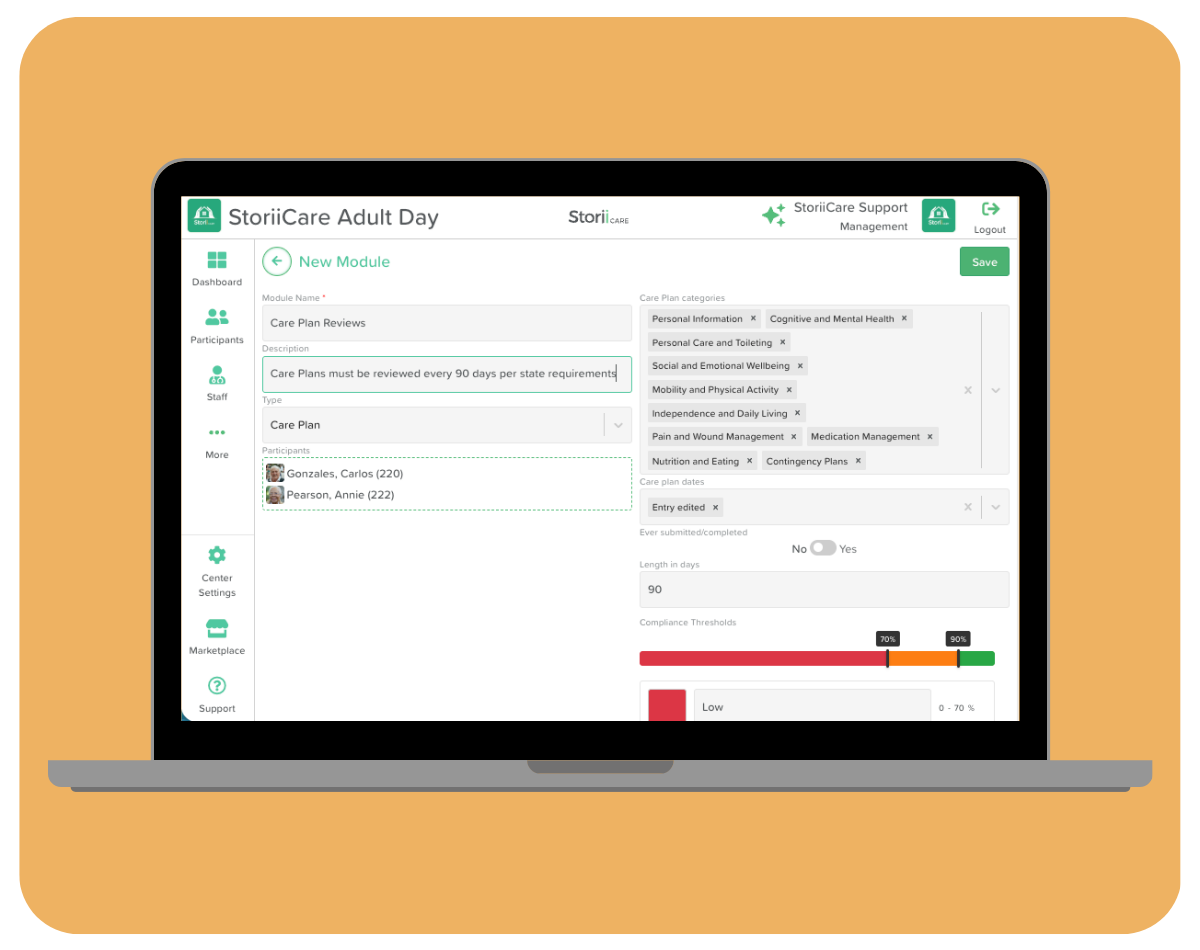
We're continuing to expand our library of compliance modules - this time with Care Plans. We've also added a participant list to the Compliance feature, so you can choose which individuals or groups a compliance check applies to, rather than having it run against everyone.
A Guide to Using the Compliance Feature →
Interactive Analytics
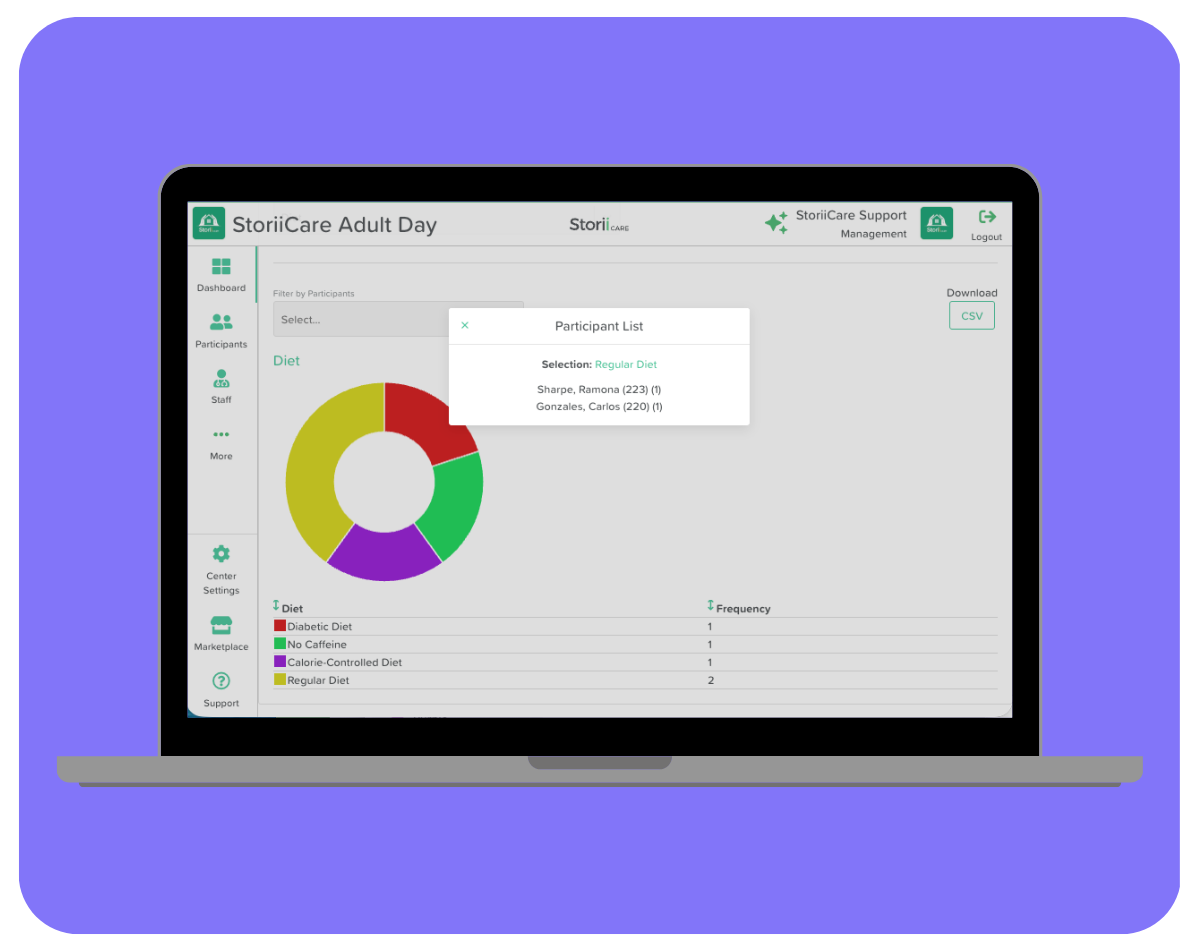
Analytics just got more interactive. You can now click on any segment of a pie chart, data field name, or on a participant count, to see exactly which participants make up that category. No need to cross-reference a separate report to find out who's behind the numbers.
A Guide to the Analytics Feature →
Quality Enhancements
AI Voice Agent Improvements
We've made several improvements to our AI Support Voice Agent, accessible from the Support page in your StoriiCare account by clicking "Talk to our AI agent":
- Knowledge base auto-sync: The agent's knowledge base now syncs automatically, pulling in new or updated Help Articles.
- Upgraded turn-taking: The agent is now better at recognizing when you've finished speaking versus simply pausing, cutting down on awkward interruptions or talk-overs.
- Chat alongside voice: You can now type mid-call and see a full transcript, rather than relying on audio alone.
- Article link sharing: The agent can now share Help Article links directly in chat, giving you extra context or a place to explore images and videos if the conversation hits a roadblock.
"Services" is Now "Rates"
"Services" has been renamed to "Rates" across the platform to better align with the terminology care providers and their billing departments already use.
Automatic Invoice Receipts for Private Payers
StoriiCare now automatically emails an invoice receipt once a payer has initiated payment. A receipt download button has also been added to the payment confirmation page once payment is complete.
Staff Birthdays on the Dashboard
Per client feedback, Staff Birthdays now appear in the birthday widget on the Dashboard alongside participant birthdays. These pull from the Date of Birth field on Staff Records.
Editing the Staff Records Template→
Preview PDF Attachments
You can now preview PDF attachments on Notes or in Documents directly within StoriiCare, without needing to download the file to your device first.
"Hours of Operation" and "Capacity" Fields
We've added "Hours of Operation" and "Capacity" fields to the Profile tab in Center Settings, giving providers a place to store these important center details right within StoriiCare.
Side Panel Redesign
The StoriiCare side panel got a makeover! You'll no longer see a "..." menu hiding certain features. Everything is now in plain view with a scrolling feature for smaller screens, so you can see and take advantage of everything StoriiCare has to offer.
Questions or feedback?
As always, we love hearing from our community. If you have questions about any of these updates or ideas for future features, get in touch with our team.