A StoriiCare trabalha constantemente no desenvolvimento de novos recursos poderosos e melhorias de produto. Aqui está um breve resumo das nossas atualizações mais recentes:
Destaques Rápidos
- Lançamento do recurso eMAR (Beta)
- Gestão de Inventário de Medicamentos
- Upload de arquivos 835 ERA para reconciliação de sinistros + Reconciliação automática de sinistros
- Ordenar participantes por número do quarto
- Integração com MatrixCare
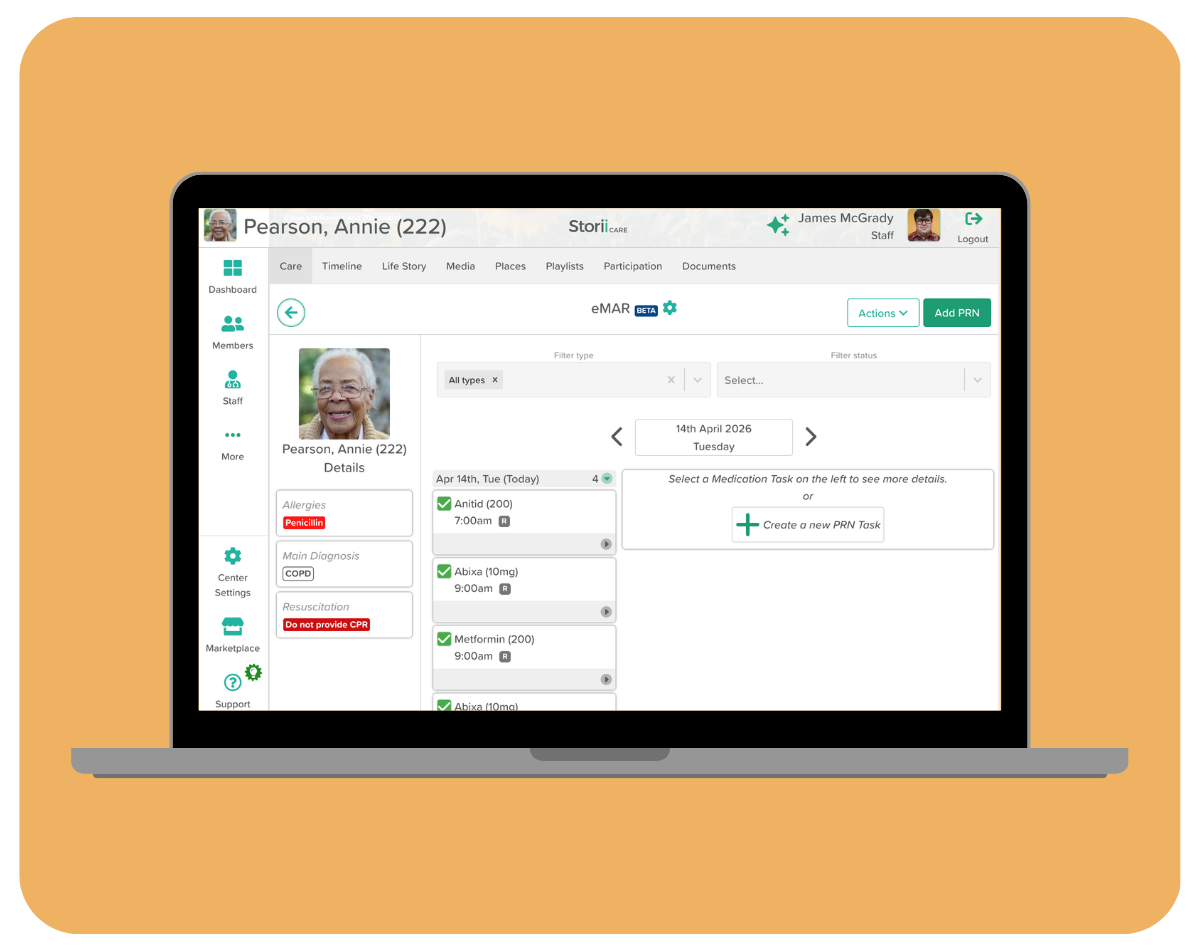
Registro Eletrônico de Administração de Medicamentos (eMAR)
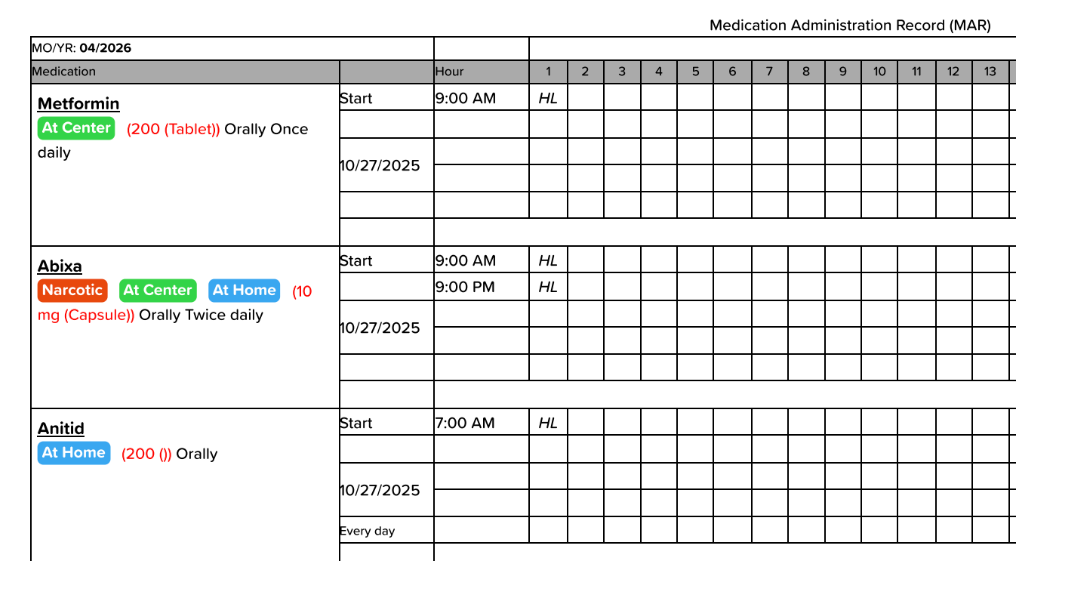
Estamos entusiasmados em apresentar a versão Beta do eMAR (Registro Eletrônico de Administração de Medicamentos) da StoriiCare. Este recurso já está acessível nos perfis dos participantes. O eMAR permite que a equipe de cuidados documente digitalmente a administração de medicamentos diretamente no StoriiCare, eliminando a necessidade de imprimir folhas de MAR em papel e reduzindo o risco de erros na medicação.
📋 O eMAR está disponível atualmente em beta. Observe que estamos coletando feedback e fazendo melhorias incrementais nesta funcionalidade.
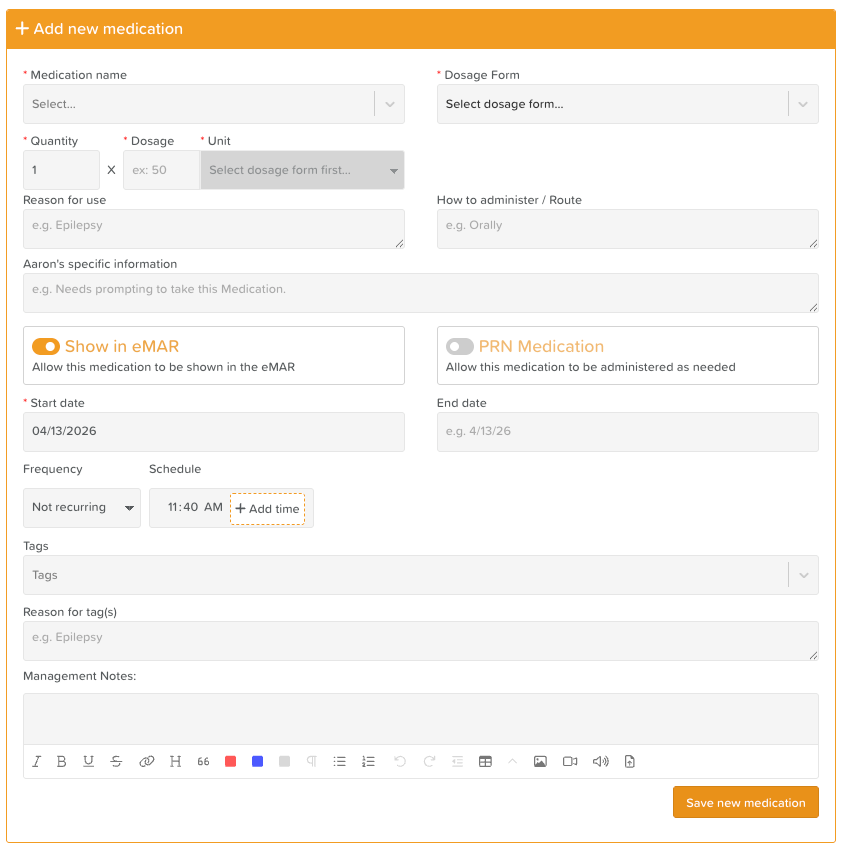
Os usuários notarão uma visualização nova e aprimorada ao adicionar medicamentos aos perfis dos participantes (via Informações Médicas). Ao salvar, novos medicamentos gerarão automaticamente tarefas de eMAR para a equipe clínica concluir. Medicamentos existentes podem ser facilmente transferidos para tarefas de eMAR.
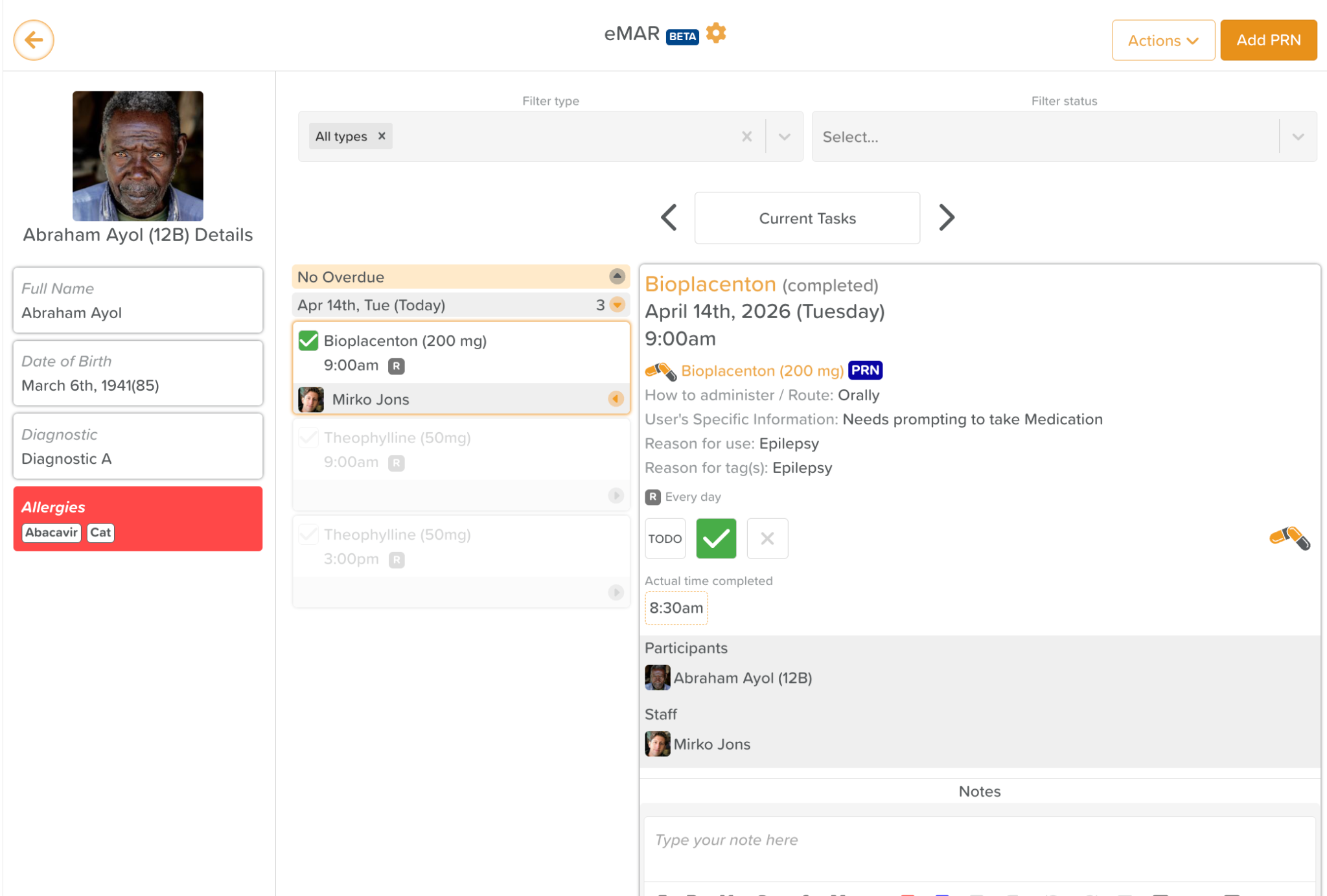
A partir do recurso eMAR, as equipes de cuidados podem registrar eventos de administração de medicamentos em tempo real. O eMAR funciona de forma semelhante ao recurso de Tarefas do StoriiCare. Quando uma tarefa de medicação é concluída, as iniciais do membro da equipe que administrou o medicamento aparecerão no PDF do MAR, permitindo exportações de PDFs de MAR pré-preenchidos.
Gestão de Inventário de Medicamentos
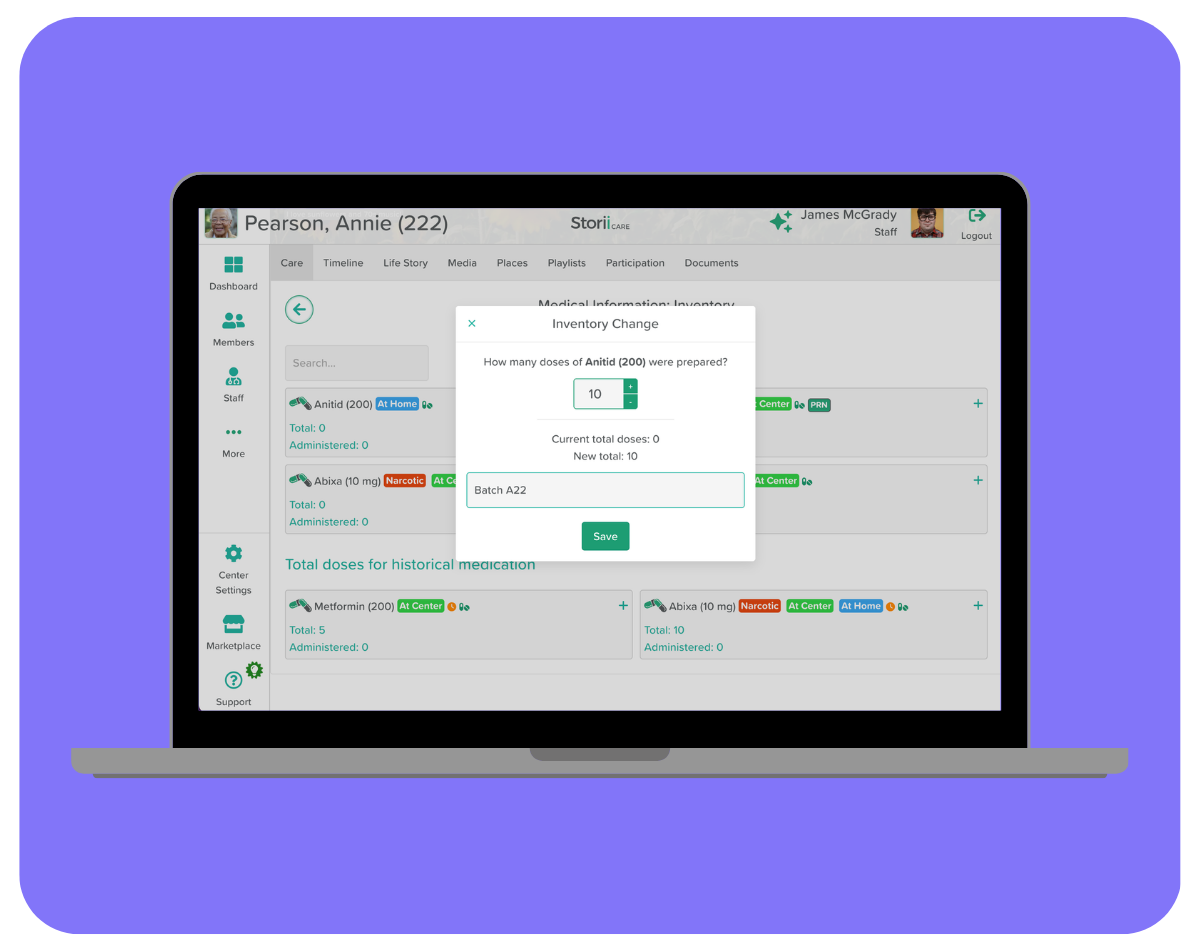
Juntamente com o eMAR, introduzimos o Inventário. O Inventário pode ser acedido a partir do menu Ações no eMAR e em Medicamentos. Esta funcionalidade dá à sua equipa visibilidade sobre os níveis de stock de medicamentos diretamente no StoriiCare. Ajuda a evitar situações em que a medicação de um participante acaba inesperadamente e mantém os seus registos prontos para auditoria.
A configuração do inventário é opcional, mas recomendada para um registo preciso da medicação.
Quando o Inventário é preenchido para um Medicamento, os funcionários que completam uma tarefa de eMAR serão solicitados a selecionar o lote de inventário relevante e a inserir o número de doses consumidas. O ecrã apresentará o total de doses atual e o novo total de doses antes de o funcionário submeter, garantindo total visibilidade.
Ver: Como Configurar o Inventário de Medicamentos
Carregamento Manual de Ficheiros 835 ERA + Reconciliação Automática de Reivindicações
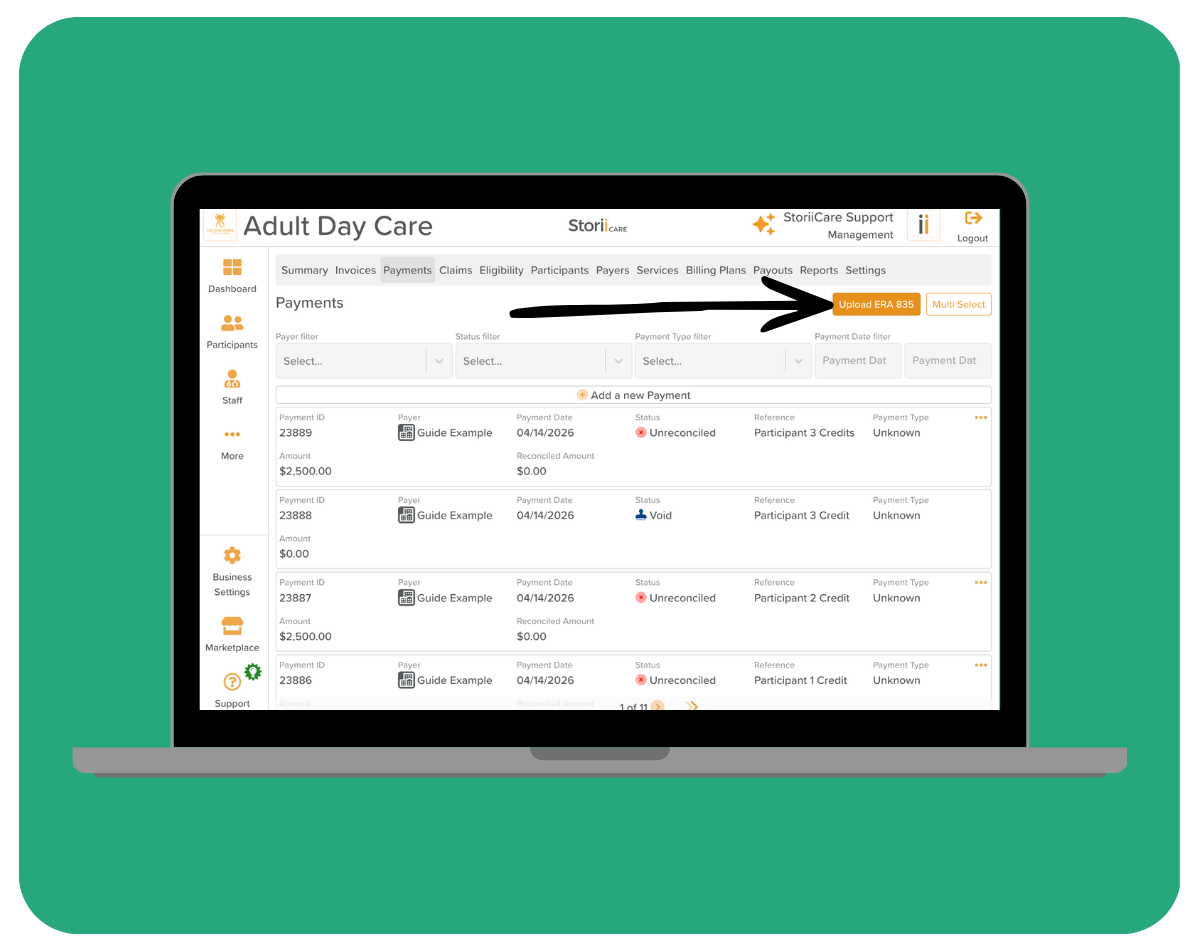
A gestão de faturação e remessas tornou-se muito mais fácil. O StoriiCare suporta agora o carregamento de ficheiros de Aviso de Remessa Eletrónica (ERA) 835, permitindo que a sua equipa de faturação reconcilie pagamentos de seguros diretamente na plataforma. Se estiver a utilizar o nosso parceiro de câmara de compensação, a Stedi, não é necessário qualquer carregamento manual - as reivindicações serão reconciliadas automaticamente através da nossa ligação API!
Um ficheiro 835 é o formato eletrónico padrão utilizado pelos pagadores (companhias de seguros e programas Medicare/Medicaid) para comunicar detalhes de pagamento de reivindicações e ajustes.
Carregar estes ficheiros para o StoriiCare permite-lhe:
- Corresponder automaticamente os pagamentos recebidos com as reivindicações submetidas
- Identificar rapidamente reivindicações recusadas, ajustadas ou parcialmente pagas
- Reduzir a introdução manual de dados e erros de reconciliação
- Manter um histórico de pagamentos claro para fins de auditoria e relatórios
Para carregar um ficheiro 835:
- Navegue até à secção de Faturação
- Clique no separador Pagamentos
- Clique no botão Carregar 835 ERA
Após o carregamento, as faturas associadas serão automaticamente marcadas como Pagas.
Visualizar: Como carregar um arquivo 835 ERA para remessa de sinistros
Ordenar participantes/residentes por número do quarto
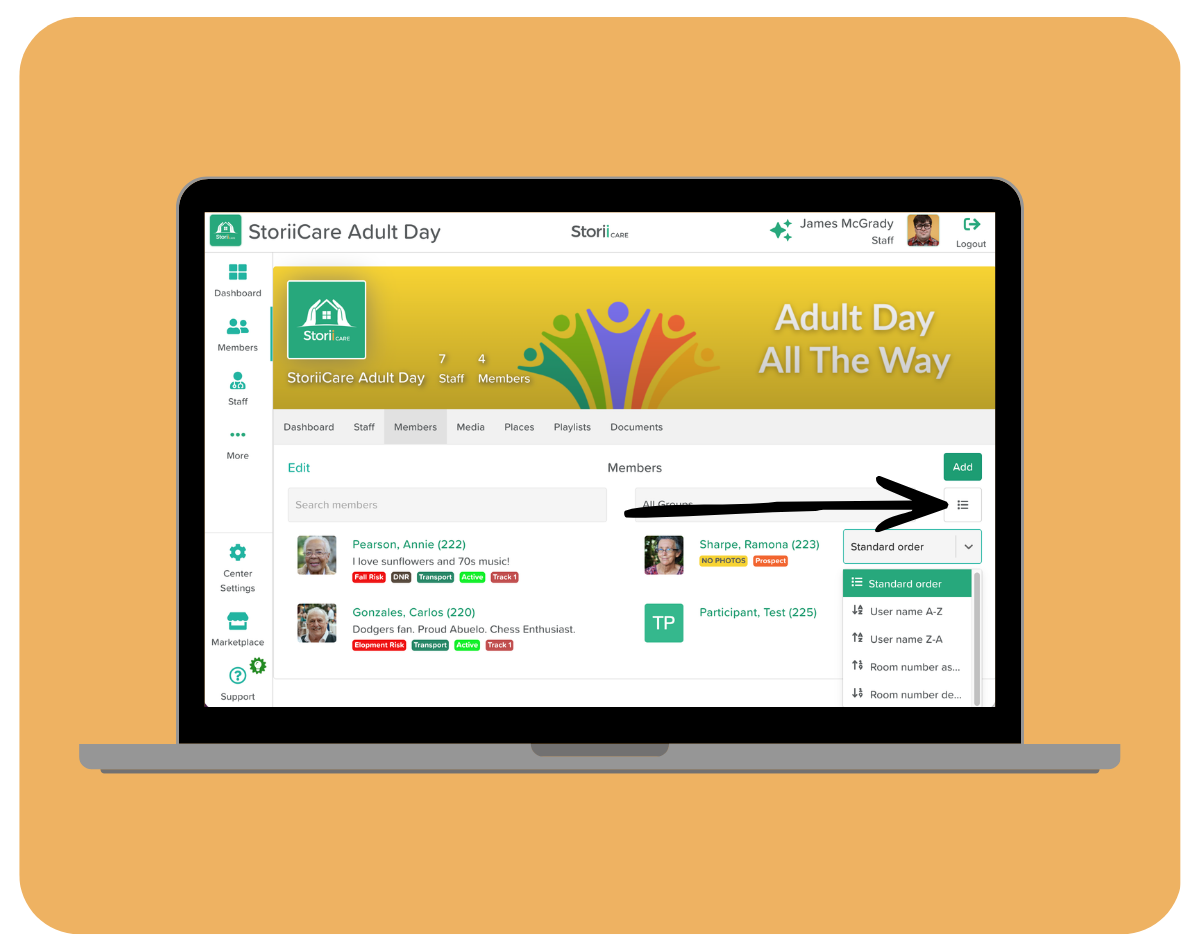
Para prestadores de cuidados residenciais, adicionamos uma opção de ordenação muito solicitada na página do residente: agora você pode classificar sua lista pelo número do quarto, em ordem crescente ou decrescente.
Isso torna muito mais fácil organizar sua visualização de acordo com o layout físico da sua instalação — particularmente útil ao realizar rondas de medicação, verificações de cuidados ou qualquer fluxo de trabalho que siga uma sequência andar por andar ou quarto por quarto.
Os números dos quartos são gerenciados dentro do perfil de cada residente. Se você ainda não atribuiu números de quarto aos seus residentes, pode fazê-lo editando os detalhes da Ficha de Identificação (Face Sheet). Além disso, nas Configurações da Empresa, as organizações podem ativar a opção “Mostrar quarto após o nome” para exibir o número do quarto ao lado do nome do residente no StoriiCare.
Integração com MatrixCare
O StoriiCare agora integra-se diretamente ao MatrixCare, uma das principais plataformas de gestão de cuidados residenciais.
Esta integração permite um fluxo contínuo de dados clínicos e de participantes entre o MatrixCare e o StoriiCare, reduzindo a duplicidade de entrada de dados e mantendo ambos os sistemas sincronizados. Para organizações que já utilizam o MatrixCare, isso significa que sua equipe pode continuar trabalhando em seu ambiente familiar enquanto aproveita as ferramentas de faturamento, engajamento, atividades e comunicação familiar do StoriiCare.
O que a integração suporta:
- Sincronização de dados demográficos dos participantes entre plataformas
- Redução na reentrada manual de dados entre sistemas
- Um registro de cuidados conectado que abrange documentação clínica e de vida diária
- Integração simplificada para novos participantes que já estão no MatrixCare
Para começar a usar a integração com o MatrixCare, entre em contato com nossa equipe de suporte ou com seu gerente de conta dedicado. Nossa equipe irá orientá-lo durante o processo de configuração.
Dúvidas ou comentários?
Como sempre, adoramos ouvir nossa comunidade. Se você tiver dúvidas sobre qualquer uma dessas atualizações ou ideias para futuros recursos, entre em contato com nossa equipe.